---
title: "Intro videos"
description: "A rep records a short hello. Sales Coach texts it to the homeowner."
---
> Documentation Index
> Fetch the complete documentation index at: https://guides.channelautomations.com/llms.txt
> Use this file to discover all available pages before exploring further.
# Intro videos
[Open original guide with interactive examples →](/originals/intro-videos/)
## Watch the walkthrough
A narrated 30-second tour. Turn on captions with the CC button. The names and times on screen are example data. Prefer paper? [Download the PDF](/originals/intro-videos/public-media/intro-videos/intro-videos-sop.pdf).
**The short version** An owner or admin opens **Sales Coach → Settings → Intro videos**, switches on **Let reps send intro videos**, and saves. From then on, every assigned visit in the Sales Coach iPhone app shows **Send my intro**. The rep records, taps **Send intro**, and Sales Coach texts it inside your business hours. Managers follow every intro in **Sales Coach → Intros**.
## Why it matters
A homeowner books a visit, then days later a stranger knocks on the door. Many hesitate, and some don't open at all.
**Before**The homeowner doesn't know who is coming. Some cancel, some don't answer, and the rep starts cold.
**Now**The homeowner gets a short video hello from the rep, from your company's number, before the visit.
**Why that helps**A familiar face at the door: fewer no-shows and a warmer first minute. Every intro and reply stays in your CRM.
## Admin setup (once)
Owners and admins set this up in the CRM. Managers can see the settings but not change them.
1. Open **Sales Coach**, then **Settings**, and scroll to **Intro videos**.
2. Switch on **Let reps send intro videos**. This also hides customers' phone numbers in the rep app.
3. Set **Longest intro** between 10 and 30 seconds. 20 seconds (the default) keeps the video sharp as a text message.
4. Pick **When to send**: **As soon as allowed (inside business hours)**, or 2, 4, 12, 24 or 48 hours before the visit.
5. Write up to 10 message templates and choose one as **Default**. Use the field buttons to add the customer's name, the rep's name, the visit date and time, and your company name.
6. Check **What the homeowner reads (sample customer)**, then click **Save intro settings**.
| Field | What it adds |
| --- | --- |
| {{contact.firstname}} | The homeowner's first name, or "there" when it's missing. |
| {{contact.lastname}} | The homeowner's last name. |
| {{rep.name}} / {{rep.firstname}} | The rep's full or first name, or "your consultant" when it's missing. |
| {{appointment.date}} / {{appointment.time}} | The visit date and time, in the visit's time zone. |
| {{workspace.name}} | Your company name. |
The starting template reads: _"Hi {{contact.firstname}}, this is {{rep.name}} from {{workspace.name}}. I'll see you on {{appointment.date}} at {{appointment.time}}. Here's a quick hello so you know who to expect. Reply STOP to opt out."_
**Every template must tell the homeowner they can reply STOP to opt out.** The settings won't save without it. Turning intro videos off cancels every intro that hasn't been sent yet.
## Rep: record and send an intro
1. In the Sales Coach iPhone app, open the visit and tap **Send my intro**.
2. The front camera opens under **Say hello to {first name}**. Tap the red button to record. The ring counts down and stops at your team's limit.
3. Watch it back. Tap **Retake** to try again, or **Send intro**.
4. If your team has more than one template, pick one under **Text they'll get with your video**.
5. You'll see **Your intro is on its way**. The visit card then shows **Intro queued**, **Intro sent**, and finally **Intro delivered**.
Keep it short and friendly: your name, the company, the visit time, and something like "see you then".
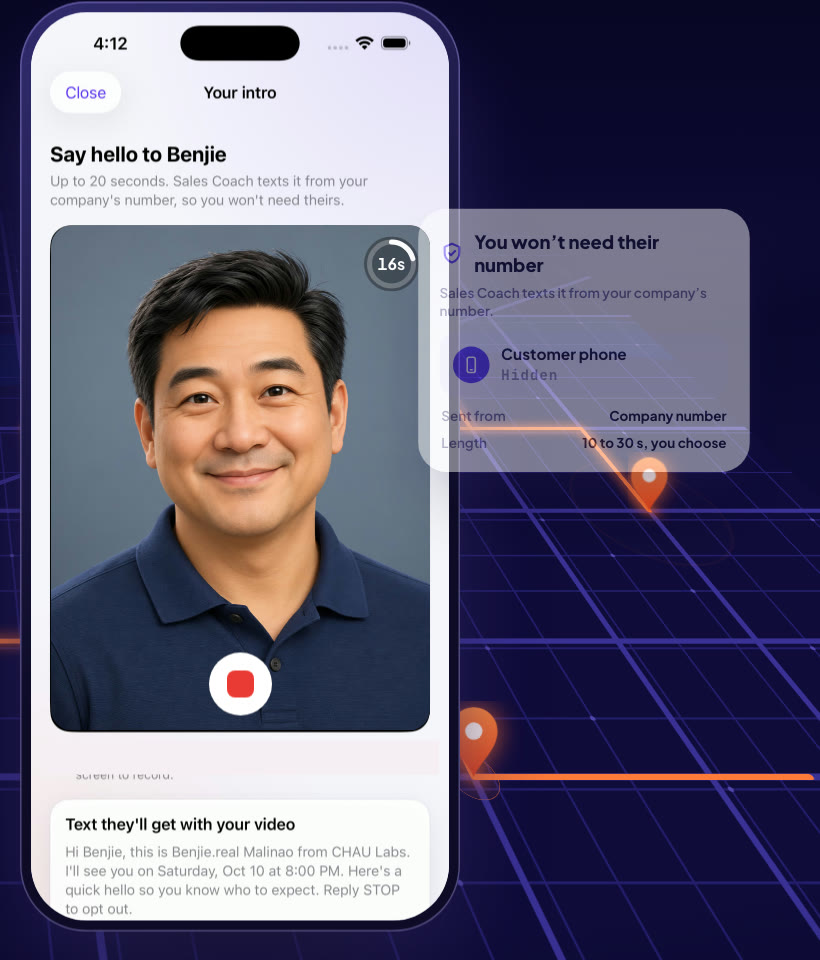
ExampleRecording an intro on the visit.
**One intro per visit.** Once an intro is queued or sent, the button is replaced by its status. If it didn't send, the card says why and, where possible, lets the rep record a new one.
## What the homeowner gets, and where replies go
- A text from your company's number: the same number that customer already texts with. The video plays right in the message.
- The message is your template, filled in with their name, the rep, and the visit time.
- **Replies come to LiveChat**, on that contact, not to the rep. The intro itself is saved in the contact's conversation, so your team sees exactly what was sent.
- On the contact page, the Sales Coach visit shows "Rep's intro video delivered" (or sent, or queued).
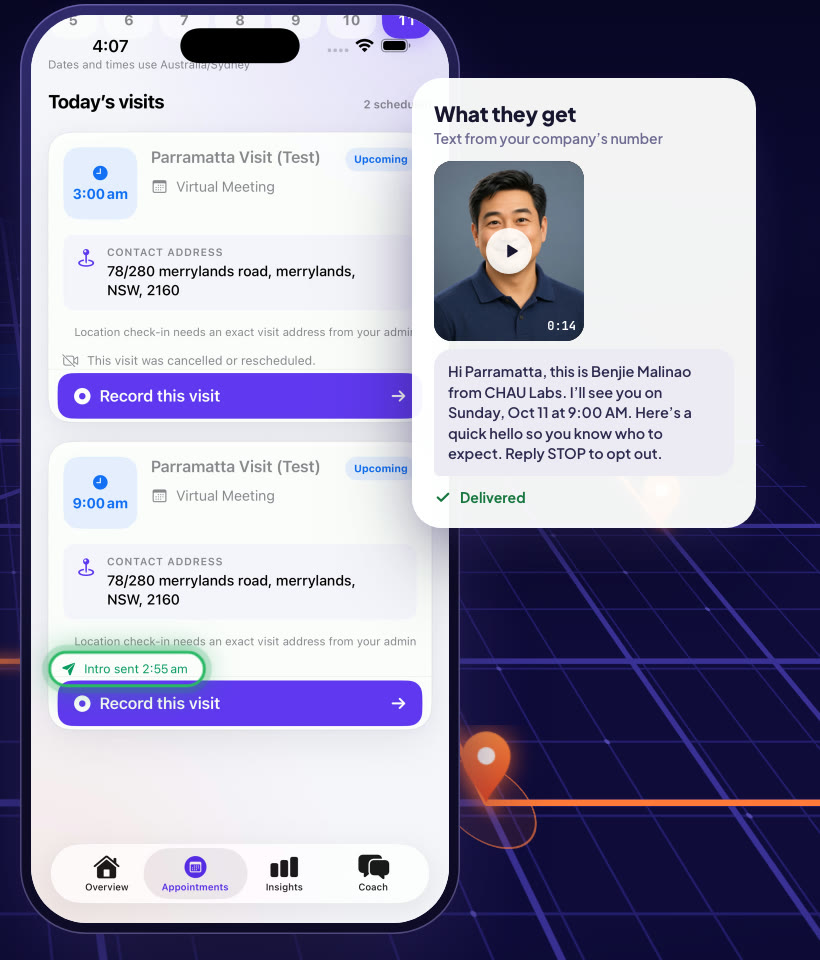
ExampleWhat the homeowner receives.
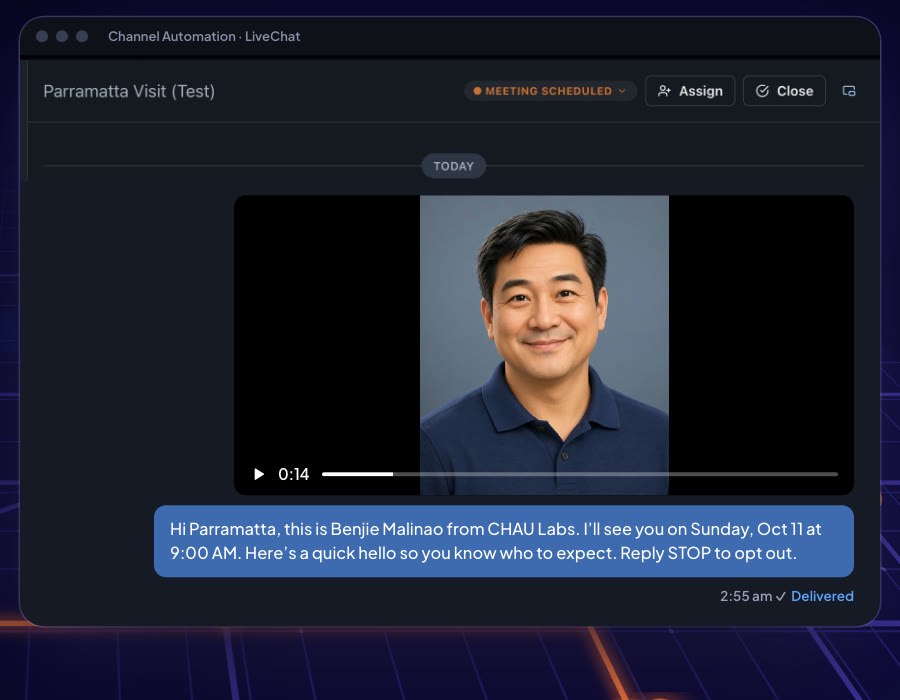
ExampleThe intro saved in the contact's LiveChat conversation.
## When an intro goes out, and when it never does
| Rule | What happens |
| --- | --- |
| Business hours | Intros only go out inside your business hours, or 8am–8pm in the visit's time zone if business hours are off. Outside them, the intro waits. |
| When to send | "As soon as allowed", or the hours before the visit you chose. It always goes out before the visit starts. |
| No time left | If there's no business-hours time before the visit, it isn't sent, and the rep sees "There was no time inside business hours to send it before the visit." |
| Visit changed | A visit that is cancelled, rescheduled, already started, or already has an outcome never gets an intro, even one already queued. |
| Opt-outs | Customers who opted out of texts or are marked do-not-contact are never texted. |
| Phone number | Only US or Canadian mobile numbers. No mobile number on file means no intro. |
| Kept for | Intro videos are deleted 60 days after sending. |
## Managers: the Intros view
Open **Sales Coach → Intros**: every intro video your reps sent in the last 14 days, and when the homeowner got it. It refreshes on its own.
| Column | What it shows |
| --- | --- |
| Rep · Customer · Visit | Who sent it, to whom, for which visit. |
| Recorded · Text sent | When it was recorded and when it was texted. |
| Status | The badge below, with the reason when it didn't go out. |
| Channel | RCS or MMS, depending on the homeowner's phone. |
| Rep page | "Opened" and when, if the homeowner opened the rep's Meet Your Rep page. |
| Video | **Play** to watch the intro. |
| Status | Meaning |
| --- | --- |
| Uploading · Preparing video | The rep just sent it; the video is being readied for texting. |
| Waiting for send time | Queued for your send window. |
| Sending · Sent | On its way to the homeowner. |
| Delivered · Read | It reached the homeowner's phone (Read where their phone reports it). |
| Didn't send | It failed. The reason shows under the badge. |
| Not sent | It was stopped on purpose: the visit changed, the customer opted out, or intros were turned off. |
**Allow a new intro** appears only when sending could not be confirmed. The homeowner may already have it. Check with them first; otherwise they get two.
## Privacy
- While intro videos are on, reps don't see customers' phone numbers or email addresses in the app, so every conversation stays with your team.
- Texts always come from your company's number, never the rep's personal phone.
- Every message tells the homeowner they can reply STOP. Opted-out and do-not-contact customers are never texted.
- Videos are deleted after 60 days.
## Who can do what
| Role | Can do |
| --- | --- |
| Rep | Record and send an intro for their own assigned visits, in the Sales Coach iPhone app. |
| Manager | See the settings and the message preview, use the Intros view, and Allow a new intro. |
| Owner, admin | Everything above, plus turn intro videos on or off and edit the length, timing and templates. |
## Daily routine (2 minutes)
1. Reps: record tomorrow's intros at the end of the day, from the visit card.
2. Managers: open **Intros** each morning. Look for **Didn't send** and read the reason.
3. Check LiveChat for replies to intros, such as gate codes, parking notes or reschedule requests.
4. Use **Play** now and then to coach reps on a warm, short hello.
## Troubleshooting
| What the rep sees | Why | Fix |
| --- | --- | --- |
| "Intro videos are turned off for your team." | The setting is off. | An owner or admin switches it on in Settings → Intro videos. |
| "There is no mobile number on file for this customer." | No mobile number on the contact. | The office adds one to the contact. |
| "This customer has opted out of text messages." / "marked do-not-contact." | The customer asked not to be texted. | Don't send. Call the office line instead if needed. |
| "This visit was cancelled or rescheduled." / "has already started." | Intros go only to upcoming, unchanged visits. | Send from the new visit, if there is one. |
| "Intro didn't send. There was no time inside business hours…" | The send window closed before the visit. | Record intros earlier, or choose a shorter "When to send". |
| "Your team has no number to text from yet." / "Texting isn't set up for your team yet." | Your workspace can't send texts yet. | Ask your admin or account manager. |
| "The video was longer than the limit." / "couldn't be made small enough." | The recording was too long or too large to text. | Record a shorter one. |
| "We couldn't confirm your last intro was delivered." | The send may or may not have arrived. | Ask the office. A manager can use Allow a new intro after checking with the homeowner. |
| "Turn on camera and microphone access…" | The phone blocked the camera or microphone. | iPhone Settings → Sales Coach → allow Camera and Microphone. |
## Questions
**Does the rep need the customer's number?** No. Sales Coach sends the text from your company's number.
**Can a rep send a second intro for the same visit?** No. One intro per visit, unless the last one didn't send or a manager allows a new one.
**Who answers the homeowner's reply?** Your team, in LiveChat. The reply lands on that contact like any other text.
**Does it work with Meet Your Rep?** Yes. The Intros view shows when the homeowner opened the rep's page.
Channel Automation · Help · Last updated 2026-10-11.
Questions? Ask your account manager, or open **Help Docs** inside the app — the same guidance lives there.
Source: https://guides.channelautomations.com/coach/intro-videos/index.mdx